
When your staffing CRM migrations fail, the consequences go far beyond lost data and directly impact your bottom line. Business continuity breaks can cost $10,000 per hour minimum,1 and for staffing firms, that figure escalates quickly when recruiters lose access to candidate pipelines and can’t respond to time-sensitive client requests.
The core issue is that most firms approach CRM migration as an IT project rather than a business-critical operation. While your IT team focuses on moving data, your recruiters face weeks of reduced productivity and potential revenue loss.
Successful staffing firms take a different approach. They use proven CRM migration strategies that maintain business operations throughout the transition, protecting both team productivity and revenue streams during the changeover.
Why Migration Must Be a Business Continuity Project
Most staffing CRM migration failures happen because firms focus on technical success while ignoring operational reality. The standard IT approach creates more problems than it solves for several key reasons:
Process-Only Focus Ignores the Human Factor
Your IT team sees migration as moving database records from System A to System B. But your recruiters experience it as learning entirely new workflows while trying to hit placement targets. When you prioritize data transfer over user adoption, you create a system that works perfectly but sits unused. Recruiters default back to spreadsheets and email because the new CRM feels foreign and disruptive.
Technical Success Does Not Equal Business Success
A technically flawless migration can still devastate your operations. Data transfers correctly, integrations function properly, but your team’s productivity crashes for weeks because nobody planned for the learning curve. Meanwhile, your competitors are capturing the candidates and clients you can’t properly manage during the transition period.
IT Timelines Don’t Match Business Reality
IT teams plan migrations around server capacity and data volumes. Business teams need migrations planned around client deadlines, recruiting cycles, and cash flow requirements. When these timelines clash, business needs always lose unless you structure the CRM migration project as a business continuity initiative from day one.
The Continuous Migration Framework
Smooth data migration requires a business-first approach that keeps your team productive while transforming your systems. This framework ensures seamless CRM migration by treating each phase as a business operation, not just a technical task.
Phase 1: Business Impact Assessment
Before making any system changes, understand how your current workflows actually operate. Document which tools each recruiter relies on, identify your peak business periods, and note existing manual workarounds.
This assessment focuses on understanding which disruptions will cost you placements rather than creating a comprehensive database inventory. Identify your mission-critical processes that cannot be interrupted, even briefly.
Key areas to evaluate:
- Peak activity periods when system downtime would be catastrophic
- Mission-critical integrations like VMS connections that generate revenue
- Manual backup processes your team relies on during system issues
- Data relationships between candidate records, job orders, and client accounts
- Compliance requirements where certification tracking or audit trails must remain uninterrupted
What This Looks Like (2-3 weeks for mid-size firms)
Map your current workflows and identify critical dependencies. This phase involves interviewing key users, documenting integration points, and establishing your non-negotiable requirements.
Read More: The AI Playbook: 10 Potential First Steps for Staffing Industry Leaders
Phase 2: Tool Selection and Architecture
Choose migration tools based on business requirements rather than feature lists. Your priority should be tools that enable parallel system operation, staged data validation, and quick rollbacks when issues arise.
Effective CRM migration strategies focus on maintaining recruiter access throughout the transition, which means selecting tools that can sync data continuously rather than requiring complete system shutdowns.
Essential capabilities:
- Real-time data synchronization to run old and new systems simultaneously
- Granular rollback options that can reverse specific data sets without full system restoration
- Business hours scheduling that aligns with your operational calendar
- Validation reporting that confirms data integrity before switching over to the new CRM.
- User access controls that maintain security during transition periods
The Reality (1-2 weeks)
Choose migration technology based on your Phase 1 findings. The right tools will support your business calendar and risk tolerance, not just your data volume.
Phase 3: Controlled Transition
Execute the migration in phases that align with your business calendar. Start with non-critical data during slow periods, run parallel systems until validation is complete, and migrate high-stakes information only after thorough testing. This approach requires higher upfront investment but prevents the revenue losses that result from rushing a complete system changeover.
In Practice (3-6 weeks depending on complexity)
Execute migration in business-aligned phases. Most firms start with historical data during quiet periods, then migrate active records during scheduled maintenance windows.
Phase 4: Optimization and Adoption
Migration doesn’t end when data transfers successfully. Monitor system performance, gather user feedback, and optimize workflows based on actual usage patterns. The goal extends beyond moving data to ensuring your team operates more efficiently than before the migration started.
What Actually Happens (Ongoing)
Fine-tune performance and workflows based on real usage. This phase separates firms that simply moved data from those that actually improved operations.
Read More: Your Staffing Tech Stack Is Costing You Candidates—Here’s How to Fix It
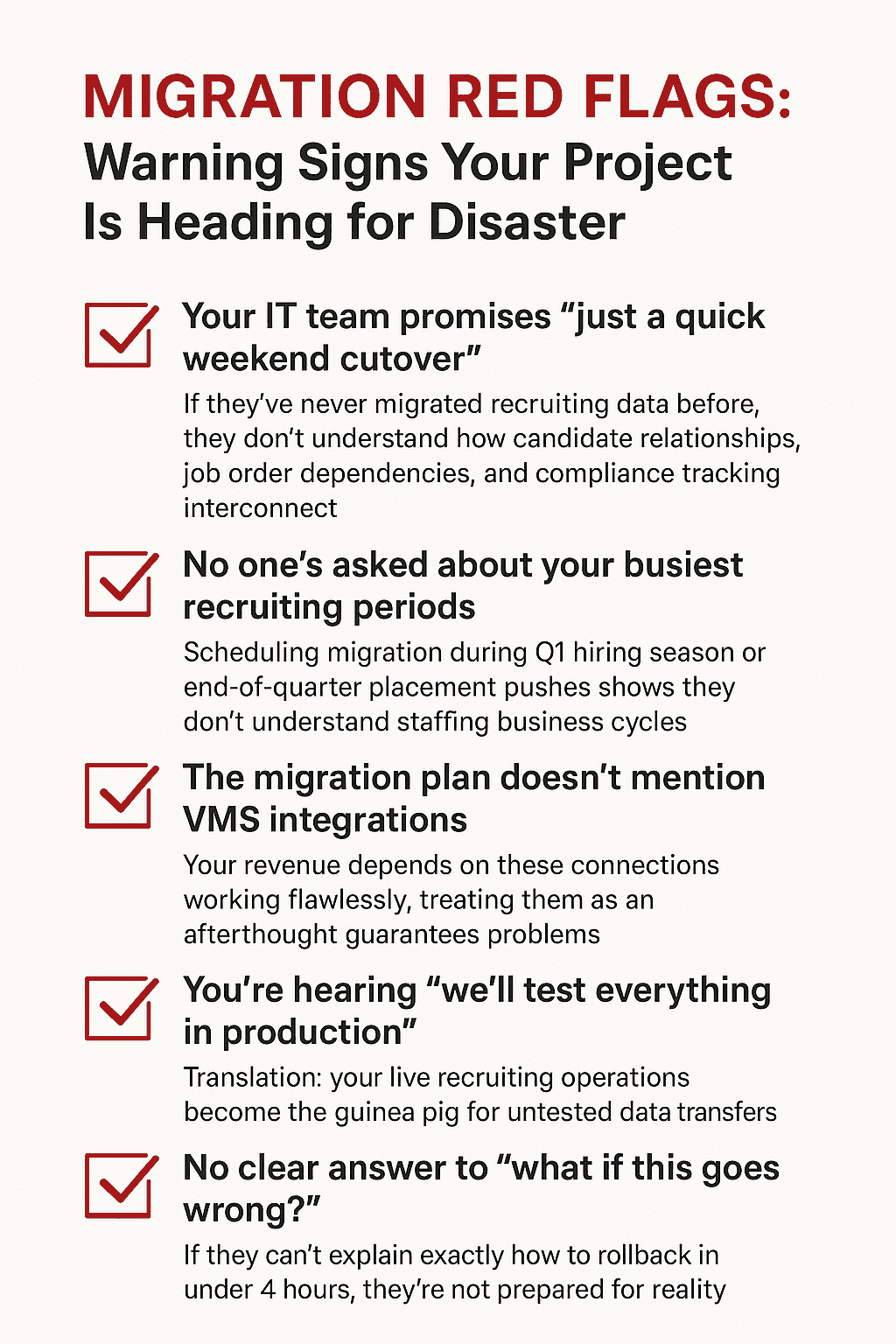
Migration Red Flags
The Bottom Line: Expertise Matters More Than Tools
Staffing CRM migration is a business continuity challenge that requires specialized expertise, not just technology solutions. Generic migration approaches fail because they ignore recruiting operations like candidate relationship data, VMS integrations, compliance requirements, and the revenue impact of recruiter downtime.
The difference between success and disaster lies in understanding staffing-specific workflows and how recruiting teams actually operate. At Newbury Partners, we specialize in seamless staffing CRM migration that keeps your team productive throughout the transition.
Our Bullhorn expertise means we understand both how to move your data and how to protect your business operations during the process. Ready to discuss your migration without the risks? Connect with our team to explore how we can execute your transition while maintaining zero downtime.
Reference
1. Shulmister, Dale. “23 Business Continuity Statistics You Need to Know.” Risk & Resilience Hub, 1 Aug. 2023, https://riskandresiliencehub.com/23-business-continuity-statistics-you-need-to-know/.