Your staffing firm probably has recruiting operations covered. Bullhorn tracks candidates, manages job orders, and keeps placements moving. But ask how your team manages business development, and the answer is usually spreadsheets, email threads, and manual follow-ups that fall through the cracks.
Who is following up with that lapsed account? Where does that prospect stand in the pipeline? Which campaigns are bringing in client inquiries?
These are growth questions, and most staffing firms do not have a system built to answer them. The issue is not whether you have a CRM. It is whether you have the right tool handling the right side of your business. That is the gap HubSpot fills, not as a replacement for Bullhorn, but as the tool that handles the side of your business Bullhorn was never built for.
What Bullhorn Does vs. What HubSpot Does
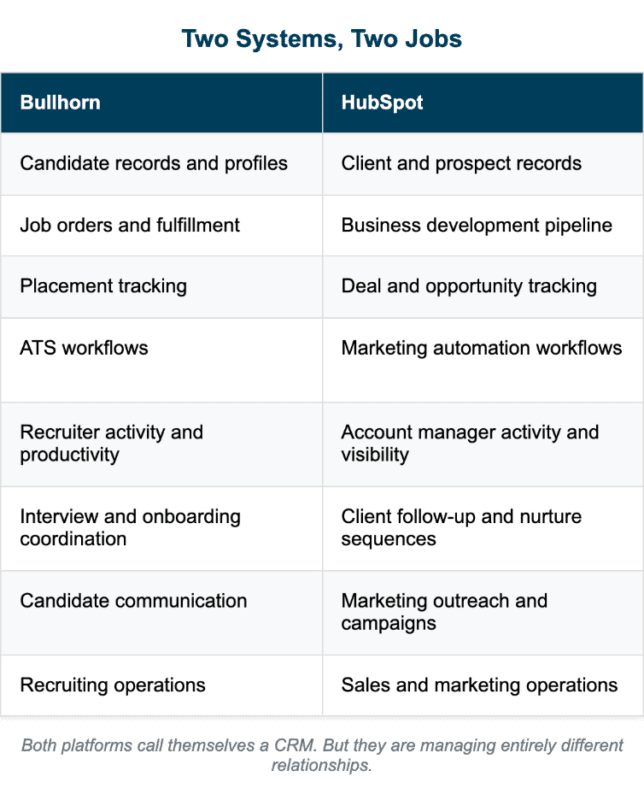
The confusion usually starts with the word “CRM.” Both platforms use it, but they are solving for entirely different relationships.
Bullhorn Owns Your Recruiting Operations
Bullhorn is built for delivery. It manages candidate records, job orders, placements, interview schedules, and recruiter activity. It tracks the entire recruiting workflow from sourcing to onboarding. This is your operations engine. When a recruiter needs to know where a candidate stands in the pipeline or whether a job order has been filled, Bullhorn has the answer. It is designed for the transactional speed and coordination that recruiting requires.
HubSpot Owns Your Business Development
HubSpot is built for growth. It manages client pipeline, business development follow-ups, marketing outreach, lead tracking, and sales visibility. It tracks the entire client acquisition and retention cycle from first contact to contract renewal. This is your growth engine. When an account manager needs to know which prospects are ready for outreach or which clients have gone dormant, HubSpot has the answer. It is designed for the relationship-building and nurturing cycles that business development requires.
Where to Actually Use HubSpot
Once the lane division is clear, these are the areas where staffing firms see the most immediate and practical value.
Client Follow-Up and Pipeline Visibility
Business development in staffing is relationship-driven and long-cycle. A prospect you spoke to three months ago might not have an active need today, but they will in Q3. Without a system tracking where every client conversation stands, those opportunities go cold, not because your team stopped caring, but because there was no trigger to follow up.
HubSpot solves this with automated follow-up sequences and deal stage tracking built around your actual sales cycle. Firms using HubSpot with integrations close eight times more deals than those using it in isolation.1
Marketing Automation for Business Development
Most staffing firms run marketing on instinct: send an email blast, post on LinkedIn, attend an event. HubSpot gives your marketing efforts structure. You can segment outreach by industry vertical or client type, track which campaigns are generating inbound inquiries, and automate nurture sequences that keep your firm visible to prospects who are not ready to engage yet.
For a business development manager handling multiple accounts, this means less time drafting individual emails and more time on conversations that actually move.
Lapsed Account Reactivation
Every staffing firm has a graveyard of former clients who went quiet after a placement or two. Reactivating those accounts manually requires someone to remember to do it, find the contact, and craft relevant outreach.
HubSpot automates that process entirely. You can build sequences that trigger based on time since last placement or last contact, so lapsed accounts get a timely, personalized touchpoint without your account managers lifting a finger.
The key is making sure contact records are segmented by activity status from the start; lapsed accounts sit in the same pipeline as active ones with no way to distinguish between them.
Recruiter-to-Account Manager Coordination
When a placement wraps up, there is often a gap between what the recruiter knows about the client and what the account manager knows going into the next conversation. HubSpot closes that gap by giving both sides visibility into the same client record. Account managers can see recent touchpoints, open conversations, and client history before picking up the phone.
Where this tends to break down is when contact structures are set up without accounting for staffing’s account hierarchy.
One client company often has multiple hiring managers across different departments, each with their own relationship history, and that needs to be reflected in how records are built inside HubSpot. Organizations using HubSpot report a 93 percent high adoption rate, which matters when coordination depends on both teams actually using the system.1
Reporting Across the Client Pipeline
Most staffing firms can tell you how many placements they made last quarter. Fewer can tell you how many prospects entered the pipeline, how long deals took to close, or which marketing efforts drove the most qualified client inquiries.
HubSpot’s reporting dashboards give sales and marketing leaders that visibility in one place. HubSpot users typically see a 30 percent ROI within six months when configured properly.1 The caveat is that out-of-the-box reporting templates are designed for product sales metrics, so they need to be reconfigured to reflect how staffing firms actually measure pipeline health and client revenue.
HubSpot Works Harder When It Is Built for Staffing
HubSpot delivers real value for staffing firms, but only when it is configured around how your business actually operates, not how a generic B2B sales team does.
Newbury Partners sets up HubSpot’s Sales and Marketing Hub to fit your client-facing workflows, integrates it with Bullhorn so both systems work together without duplication, and ensures your team has the visibility it needs to grow accounts and win new business.
Whether you are evaluating HubSpot for the first time or not getting enough from a setup you already have, talk to us about building a configuration that works for staffing.
Reference
1. HubSpot. HubSpot ROI Report 2025. HubSpot, 2025, https://53.fs1.hubspotusercontent-na1.net/hubfs/53/Data%20Assets%20Repository/ROI%20Report%202025/HubSpot%20ROI%20Report%202025.pdf.